






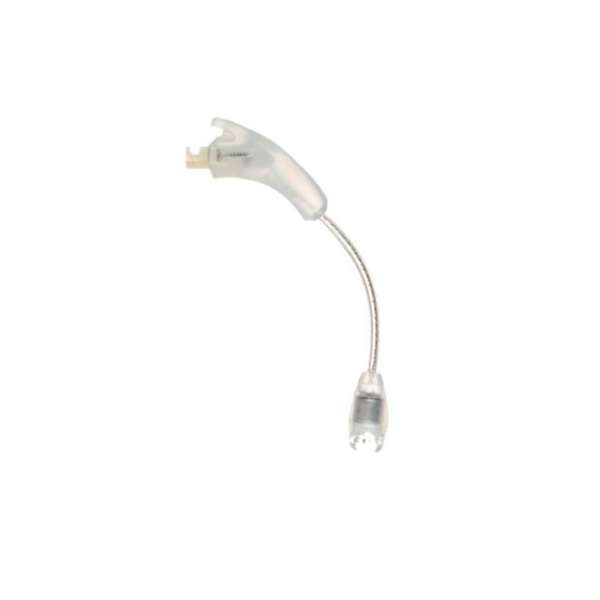

The Naida CI Q30 T-Mic is a replacement T-Mic 2 microphone for the Advanced Bionics Naída CI Q30 cochlear implant processor. It attaches where the ear hook goes and carries a small microphone on a thin arm to the entrance of your ear canal, so sound reaches you the way your outer ear naturally shapes it. It matches part number CI-5835 in sizes S, M and L.
This part is for the Naída CI Q30 implant processor, not the Phonak Naída hearing aid. Many Q30 wearers prefer the T-Mic because it lets them hold a phone to the ear like anyone else, and because it can feel more natural in conversation. When the arm cracks or the microphone fades, a replacement Naida CI Q30 T-Mic brings that everyday convenience back.
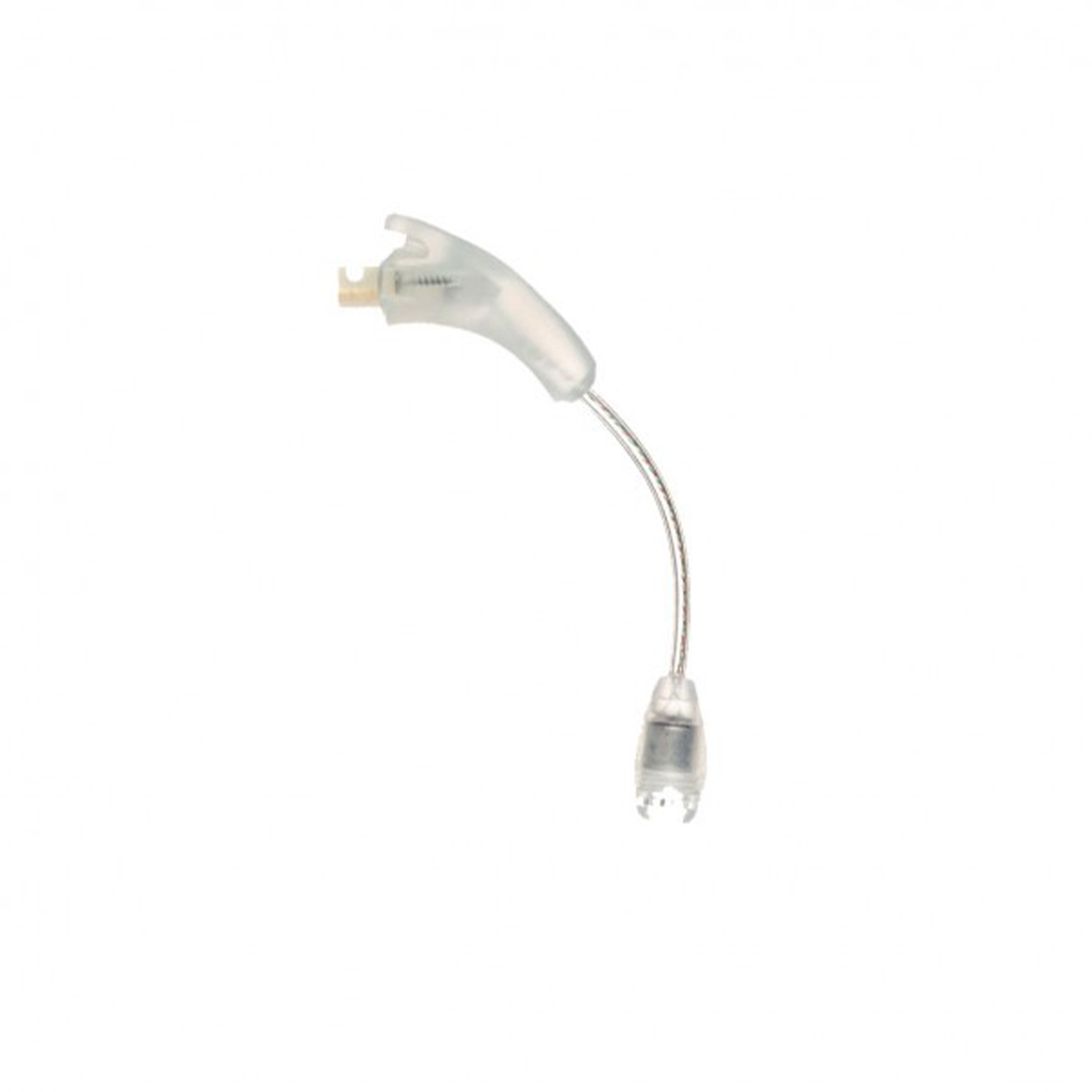



Naida CI Q30 T-Mic at a glance
| Fits | Advanced Bionics Naída CI Q30 |
|---|---|
| Part number | CI-5835 (T-Mic 2) |
| Sizes | S (-100), M (-200), L (-300) |
| Choosing a size | Tell us your size in the order notes or on WhatsApp |
| Type | Third-party replacement, compatible with the Q30 |
| Colour | As shown in the photo |
| Price | $120 (regular price $197) |
| Dispatch | 24–48 hours |
| Guarantee | Replaced or refunded if defective or wrong |
Unlike a plain ear hook, the Naida CI Q30 T-Mic contains a working microphone and fine wiring inside its arm. That is why it needs a little more care, and why it is one of the parts users most often replace.
Will this Naida CI Q30 T-Mic fit my processor?
| Processor | Fits? | Order |
|---|---|---|
| Naída CI Q30 | Yes | This product |
| Naída CI Q70 | Same CI-5835 part | Naida CI Q70 T-Mic |
| Naída CI Q90 | Same CI-5835 part | Naida CI Q90 T-Mic |
| Naída CI M90 (Marvel) | No | Different microphone system |
| Advanced Bionics Harmony | No | Harmony uses the earlier Auria T-Mic |
| Phonak Naída hearing aid | No | Not an implant product |
To identify your processor, check the model printed on the casing or in your clinic records. If you are replacing an existing T-Mic, look at the old one: the arm length tells you whether it is S, M or L, and matching it is the safest choice.
A clear photo of your processor with the old T-Mic attached, sent on WhatsApp, lets us confirm both model and size.
Why Q30 users keep a spare Naida CI Q30 T-Mic
The Naída CI Q30 was the entry model of the Q range and is still worn every day by many people. Many Q30 wearers keep their own spares for the small parts that wear fastest.
The T-Mic is a delicate part. It is the piece most likely to be bent when you remove a hat, caught by glasses, or crushed in a pocket. A spare means:
- No days relying only on the processor microphones while you wait for a part.
- No change in how calls feel while a replacement is shipped.
- Peace of mind on trips, when finding a replacement locally may be impossible.
Parents of children with a Q30 often find the T-Mic gets the hardest life of any part. It is pulled during play, caught by bike helmets and occasionally chewed. Keeping a spare at home and letting the school know where it is can save a child from a day of muffled sound in class.
Signs your T-Mic needs replacing
Users describe a failing T-Mic in several ways. Watch for:
- Sound becomes faint or muffled, even with a fresh battery.
- Crackling or rustling when the arm moves.
- Sound cuts in and out when you turn your head or touch the arm.
- A split, kink or flattened spot in the arm.
- The microphone opening is blocked by wax, dirt or a worn cover.
- No visible damage, but it stopped working; the processor still runs, yet the T-Mic seems silent.
One test helps: if sound returns to normal when you switch to a program that uses the processor microphones, the T-Mic is the likely fault.
Before ordering, rule out the simple things. Change to a freshly charged battery, look closely at the microphone opening for wax, and try a different program if your audiologist set one up for the processor microphones. If the problem disappears when the T-Mic is not in use, the microphone itself is almost certainly at fault.
It is also worth checking the headpiece cable at the same time, because a worn cable can produce very similar dropouts.
How to fit the Naida CI Q30 T-Mic
- Switch off your Q30 and take it off.
- Hold the processor firmly. Pull the old ear hook or T-Mic straight off the connector without twisting.
- Wipe the connector with a dry cloth.
- Press the new Naida CI Q30 T-Mic straight onto the connector until it sits firmly.
- Put the processor on your ear.
- Guide the thin arm down along the front of your ear so the microphone rests at the entrance to your ear canal. It should sit at the opening, not inside the canal.
- Switch on and check the sound in a quiet room, then on a phone call.
If you are moving from a plain ear hook to a T-Mic for the first time, ask your audiologist to make sure your program uses the T-Mic microphone.
The first day with a new microphone can sound slightly different, especially if the old one had been fading slowly for months. Many people notice that sound feels brighter or clearer. Give yourself a day or two to settle in before deciding whether anything needs adjusting.
Naida CI Q30 T-Mic troubleshooting
| What you notice | Likely cause | What to do |
|---|---|---|
| Sound faint or dull | Blocked microphone opening or worn cover | Clean gently with a dry brush; replace the cover if fitted. |
| Crackling when the arm moves | Damaged internal wire | Replace the T-Mic. |
| Microphone keeps popping out of the ear | Arm too short | Try the next size up. |
| Microphone pushes into the ear canal | Arm too long | Try the next size down. |
| No sound from the T-Mic at all | Failed microphone, or program set to processor mics | Check with your audiologist; replace the T-Mic if it is faulty. |
| Sound cuts out when turning head | T-Mic wire or headpiece cable | Swap in a plain hook; if dropouts stop, replace the T-Mic. If not, check the Q30 headpiece cable. |
How to make your Naida CI Q30 T-Mic last longer
- Take the processor off before pulling on jumpers, hats or helmets; the arm is easy to snag.
- Do not wrap the arm around your finger or bend it sharply when storing.
- Brush the microphone opening gently with a soft, dry brush every few days.
- Keep wax and moisture away; dry the processor overnight in a cochlear implant dryer.
- Store the processor in a hard case, never loose in a pocket or bag.
- Avoid hairspray and sunscreen near the microphone opening.
Users on hearing forums report replacing their T-Mic during the life of a processor, so expect to change it from time to time.
When you travel, pack the processor in its hard case in your hand luggage, with the microphone arm lying in its natural curve. Cases that squeeze the arm flat can kink the internal wire over time. If you swim or play water sports, remove the processor first and store it somewhere dry and shaded.
Is a replacement Naida CI Q30 T-Mic safe for my processor?
This is a third-party, compatible T-Mic 2 made to fit the Naída CI Q30 connector and to the same CI-5835 part specification. It works as a microphone input for the processor and does not alter your implant or the program your audiologist set.
We test each T-Mic before dispatch. If it arrives faulty, or is the wrong part or size, we replace it or refund you. We are an independent supplier, not Advanced Bionics.
Microphones are sensitive parts, so we pay particular attention to the arm, the connector and the microphone opening when we check each unit. If anything does not sound right in the first days of use, message us with a short description and your order number, and we will help you work out whether it is the part, the fit or the program.
Choosing S, M or L for your Naida CI Q30 T-Mic
The three sizes differ in the length of the arm that runs from the hook down to the microphone. The right size places the microphone at the ear canal opening with no pressure.
| Size | Often suits |
|---|---|
| S (small) | Children and smaller ears |
| M (medium) | Many adult ears |
| L (large) | Larger ears or a lower canal opening |
Matching your previous size is the safest choice. If the microphone used to slip out of place, go one size longer. If it pressed into the ear, go one size shorter. Children may move up a size as they grow, so check the fit every few months.
Shipping, payment and returns for the Naida CI Q30 T-Mic
Every Naida CI Q30 T-Mic order is packed and dispatched within 24–48 hours with tracking. Delivery usually takes 12–22 business days worldwide, and duties are handled for you on most routes, so there is nothing extra to pay at the door. Shipping is free on orders over $250, which is easy to reach if you add a spare cable or charger.
Payment runs through a secure payment gateway with all major cards. If we send the wrong item, or the part arrives defective or damaged, message us within 14 days with a short video. We replace it or refund you, and we cover the return shipping. Change-of-mind returns are not accepted on hygiene-sensitive hearing parts. Full details are in our return policy.
Other Naida CI Q30 parts you may need
Keep your Naida CI Q30 working with these matching spares:
- AB Q30 ear hook – Plain hook for backup or sport.
- Naida CI Q30 UHP headpiece cable – For dropouts and frayed cables.
- Naida CI Q30 PowerCel 230 battery – Full-size rechargeable.
- Naida CI Q30 PowerCel 110 Mini – Lighter rechargeable.
- Naida CI Q30 charger – PowerCel charger CI-5605.
- Electric dryer – Protects the microphone from moisture.
Naida CI Q30 T-Mic FAQ
What does the T-Mic do?
It places a microphone at the entrance to your ear canal, so your outer ear helps shape sound naturally, and you can hold a phone to your ear.
How do I choose S, M or L?
Match your current size. If the mic slips out, go longer; if it presses in, go shorter.
How do I tell you my size?
Add it to the order notes or message us on WhatsApp.
Will the Naida CI Q30 T-Mic work if my program uses the processor mics?
It will attach, but your audiologist may need to enable the T-Mic microphone in your program.
Can I use an ear hook instead?
Yes. A plain hook fits the same connector and is a useful backup.
Does it fit the Q70 or Q90?
Yes, the T-Mic 2 part is shared across the Naída CI Q range.
My T-Mic shows no damage but sounds weak. Why?
A blocked microphone opening or an internal wire fault can cause this without visible damage.
Is it for the Phonak Naída hearing aid?
No. It is for the Naída CI Q cochlear implant processors only.
Can I order without my audiologist?
Yes. No prescription is needed.
Questions about your Naida CI Q30? Message us on WhatsApp (+1 520 473 4179) with a photo of your processor and we confirm the right part before you pay.






georgebtack –
Finally, the T-Mic lets me use my phone naturally. Great price and arrived in record time. Super happy
jenniferdmusser –
Best price I’ve found for the T-Mic