






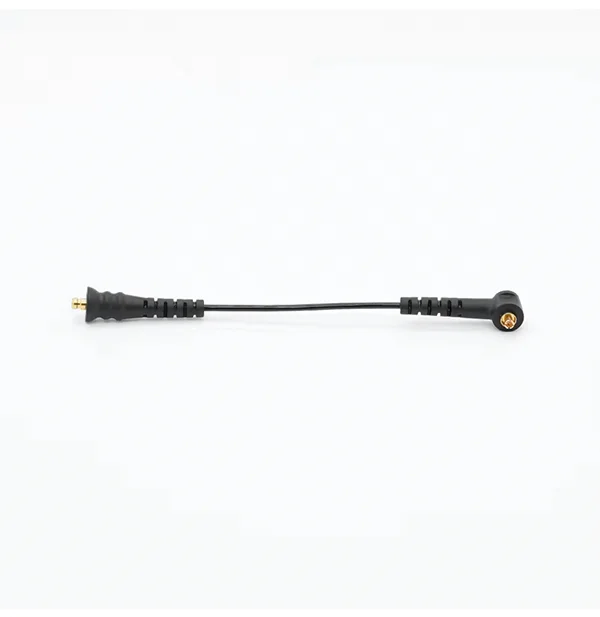




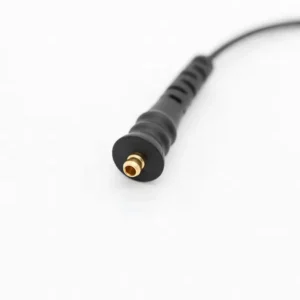


The Naida CI Q70 Cable is a replacement UHP headpiece cable for the Advanced Bionics Naída CI Q70. It connects the processor on your ear to the Universal Headpiece over your implant, and it comes in 9 cm, 11 cm or 26 cm lengths from the CI-5415 series. If your Q70 has started to cut in and out, the cable is usually the first part to check.
The headpiece cable is the Q70 part that wears fastest: it flexes every time the processor goes on and off, and it is the first place moisture gets in. Below you will find how to check the fit, how to spot a failing cable, and how to protect the one you have.




Naida CI Q70 Cable at a glance
| Processor | Advanced Bionics Naída CI Q70 |
|---|---|
| Headpiece | Universal Headpiece (UHP) |
| Cable series | CI-5415 (CI-5415-201 for 9 cm, CI-5415-202 for 11 cm) |
| Length options | 9 cm, 11 cm or 26 cm |
| Color | Black |
| Your price | $89.99 for any length (regular price $150) |
| Ships | Within 24–48 hours, tracked |
| If something is wrong | Replacement or refund within 14 days for a wrong or defective item |
Other shops may list this part as a UHP cable or a Naida Q70 cable. It is the same lead. Pick the length you use today, and if your old Naida CI Q70 Cable is too worn to read or measure, a photo on WhatsApp is enough for us to confirm the size.
Will this Naida CI Q70 Cable fit my processor?
| If you wear | Will it fit? | What to order |
|---|---|---|
| Naída CI Q70 with UHP | Yes | This cable |
| Naída CI Q30 with UHP | Yes, it uses the same CI-5415 cable | Q30 headpiece cable |
| Naída CI Q90 with UHP | Yes, it uses the same CI-5415 cable | Q90 headpiece cable |
| Naída CI M90 or M30 (Marvel) | No | Marvel uses the Slim HP headpiece and a different cable |
| Advanced Bionics Harmony | Check with us first | Send a photo of both ends on WhatsApp |
| Cochlear Nucleus or MED-EL | No | Different system |
The processor name is printed on its body. If the label has worn off, your clinic records list your processor model and serial number. A processor named M90 or M30 is a Marvel, not a Q70.
The Q70 headpiece and cable look almost the same as those on the Q90, and that is why one cable fits both. If you are moving from a Q70 to a Q90 later, the cable you buy today will still be useful.
Why Q70 users keep a spare headpiece cable
A Q70 cable carries both power and signal to the headpiece, so a single broken strand means sound that cuts out or a processor that will not connect at all. A spare in the drawer means a failed cable never leaves you waiting for an appointment.
Many people are not ready to replace a processor that still works, and an upgrade means new hardware and new fitting appointments. For them, the practical answer is to keep the Q70 running with good spares, starting with the part that fails most often.
That part is the cable. It bends every time you put the processor on or take it off, and it sits in sweat and humidity all day. Ordering a spare Naida CI Q70 Cable while it is in stock is a simple way to protect your hearing on that side.
Signs your Naida CI Q70 Cable is failing
- Sound comes on and off, especially when you turn your head
- A poor connection that gets better when you press or wiggle a plug
- Green or white residue on the pins, a sign of corrosion
- Crackling or fizzing in the sound
- Frayed or split insulation near either plug
- Sound has stopped, with no visible damage, and a different cable fixes it
Try a known-good cable before you decide. If the fault follows the old cable, replace it. If it stays with the processor, check the battery and headpiece, and talk to your clinic if nothing changes.
Moisture and corrosion: a common Q70 complaint
Reviews from Q70 users mention corrosion that caused a poor connection in both the battery and the cable to the headpiece. Sweat, rain, humid weather and steam from showers all reach the small metal contacts over time.
Corrosion on a pin does not always stop sound completely. More often it makes the connection unreliable, so sound fades or drops for a second and then returns. That pattern is easy to mistake for a processor fault.
Light dust can be wiped off with a dry, soft cloth. Do not use liquids, metal tools or abrasive pads on the pins. Once the pins on a cable are discolored or pitted, a new Naida CI Q70 Cable is usually the reliable fix.
If the battery contacts look the same, a fresh Naida CI Q70 rechargeable battery may be needed too. Dry the processor overnight before fitting new parts, so the problem does not start again.
How to fit the Naida CI Q70 Cable
- Switch the processor off and remove the PowerCel battery.
- Pull the old cable out by its plug at the processor end, then at the headpiece end.
- Look into both sockets with a good light. Green or white deposits mean moisture got in, so dry the processor before you continue.
- Check that the pins on the new cable are straight.
- Press each plug straight into its socket until it is fully home.
- Reattach the battery, switch on and place the headpiece over your implant.
- Turn your head slowly from side to side. The sound should stay steady.
Do not twist a plug while it is in the socket. If a plug will not go in, stop and look again; it is usually the wrong end or a slight angle.
Troubleshooting a Q70 headpiece cable
| What happens | Likely reason | Next step |
|---|---|---|
| Sound drops when you move your head | A broken wire inside, or a cable that is too short | Swap in a spare; if the dropouts stop, replace the old cable |
| Sound returns when you press the plug | A loose fit or corroded pins | Reseat the plug; replace the cable if the pins are discolored |
| Static or a fizzing sound | Moisture in the connector | Dry overnight before refitting |
| Headpiece warning while the headpiece is on | Plug not seated, or a failed cable | Reseat both ends, then try another cable |
| Battery and cable both seem unreliable | Corrosion after humid weather | Dry the processor, check the battery contacts, replace parts that stay faulty |
| Still silent with a new cable | Headpiece, battery or processor fault | Contact your clinic |
How to make your Naida CI Q70 Cable last longer
- Dry the processor and cable every night, using an electric dryer for hearing processors if you live somewhere humid.
- Take the processor off for sport, showers and swimming.
- Avoid sharp bends where the wire meets the plug; that is where most cables wear out.
- Store the processor loosely in a hard case, not with the cable wound tight.
- Wipe the pins with a dry cloth once a week and look for any color change.
- Keep the spare sealed in its bag until you need it.
A cable is a wear part. With daily use, every wearer replaces one sooner or later, so it makes sense to have a spare ready.
Choosing the right length for your Q70
The three lengths of the Naida CI Q70 Cable do the same job. The difference is only how far the cable reaches from the processor to the headpiece, and a good fit matters more than most people expect.
- 9 cm (CI-5415-201): for a headpiece that sits close behind the ear. Often the right choice on smaller heads.
- 11 cm (CI-5415-202): a little more reach, for larger heads or a headpiece placed further back.
- 26 cm: for wearing the processor off the ear, for example clipped to a collar. Too long for most people who wear the Q70 behind the ear.
A cable that is too short pulls on the headpiece and can make it slip off the implant site, which sounds like a dropout. A cable that is too long makes a loop that snags on glasses, masks and hats. Both shorten the life of the wire.
If your old cable has always felt right, order the same length. If you have struggled with the headpiece slipping or the cable catching, mention it when you message us, and we will help you choose the Naida CI Q70 Cable length that suits how you wear your processor.
Is a replacement cable safe for an older Naída CI Q70?
Yes. This is a third-party replacement, not an Advanced Bionics product, and it is made to the same CI-5415 connector, length and specification as the cable it replaces. We check each one before dispatch.
Your program is stored in the processor, not in the cable, so a new cable does not change your settings. If a cable arrives defective or in the wrong length, we replace it or refund you.
When your Q70 is out of warranty, trying a new cable is a sensible first step before you consider a repair or an upgrade. If sound still does not return, the cable was not the cause, and your clinic should check the rest of the system.
Shipping, payment and returns for the Naida CI Q70 Cable
Every Naida CI Q70 Cable order is packed and dispatched within 24–48 hours with tracking. Delivery usually takes 12–22 business days worldwide, and duties are handled for you on most routes, so there is nothing extra to pay at the door. Shipping is free on orders over $250, which is easy to reach if you add a spare cable or charger.
Payment runs through a secure payment gateway with all major cards. If we send the wrong item, or the part arrives defective or damaged, message us within 14 days with a short video. We replace it or refund you, and we cover the return shipping. Change-of-mind returns are not accepted on hygiene-sensitive hearing parts. Full details are in our return policy.
Other Naida CI Q70 parts you may need
Keep your Naida CI Q70 working with these matching spares:
- Naida CI Q70 rechargeable battery (PowerCel 230) – a fresh battery if the contacts are worn
- Naida CI Q70 PowerCel battery charger – keep your batteries charged at home or away
- Naida CI Q70 T-Mic 2 – the ear canal microphone for the Q70
- Electric dryer for processors – nightly drying to slow corrosion
Naida CI Q70 Cable FAQ
Is this cable in stock for the Q70?
Yes. This third-party replacement cable is in stock, fits the Q70 with the Universal Headpiece and dispatches within 24–48 hours.
If I upgrade to a Q90 later, will this cable still work?
Yes. The Q70 and Q90 use the same UHP and CI-5415 cable, so it carries over. A Marvel processor (M90 or M30) needs a different cable.
Can corrosion be cleaned off the pins?
Light dust can be wiped away with a dry cloth. If the pins are discolored or pitted, replace the cable rather than scraping it.
My battery and cable both seem unreliable. Which should I replace first?
Test one at a time. Fit a spare cable first. If the problem stays, try another battery. Changing one part at a time shows you which one has failed.
Which length do I need?
The one you wear now: 9 cm, 11 cm or 26 cm. Send us a photo next to a ruler if you are unsure.
Is the price the same for every length?
Yes. The Naida CI Q70 Cable is $89.99 in all three lengths.
How many spare cables should I keep?
One spare is enough for most people. If you travel often or live far from help, two gives extra peace of mind.
Does the cable come with a headpiece?
No. This is the cable only. It plugs into the Universal Headpiece you already have.
Can I fit it myself?
Yes. It takes a couple of minutes and no tools. Follow the steps above and hold the plugs, not the wire.
Questions about your Naida CI Q70? Message us on WhatsApp (+1 520 473 4179) with a photo of your processor and we confirm the right part before you pay.






zukaarimoto –
strong cables perfect for daily wear
rukimimekiku –
reliable connection and is super comfortable to use