






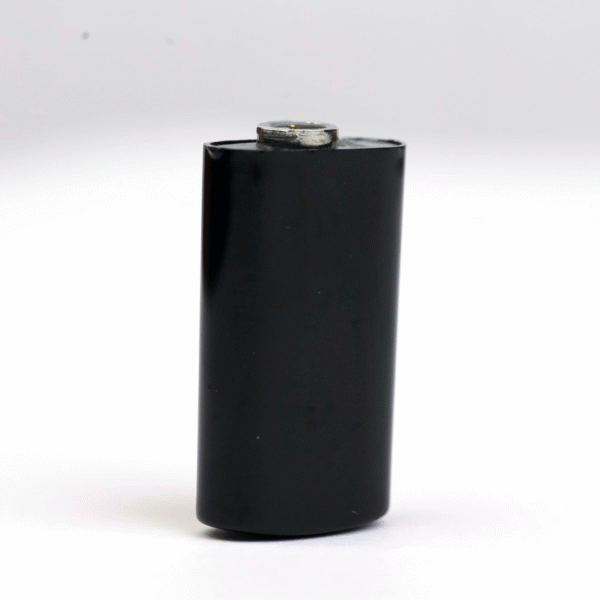


The Cochlear N7 Rechargeable Battery is a standard-size replacement battery module for the Cochlear Nucleus 7 (CP1000) sound processor. It clicks onto the bottom of your processor, charges in your Nucleus 7 Y charger or USB charger, and replaces part number Z544550. If your current N7 battery no longer lasts the day, has cracked, or will not charge, this is the part that gets you hearing again.
A worn battery is the most common reason a Nucleus 7 stops lasting the day. We keep the Cochlear N7 Rechargeable Battery in stock, ship it worldwide within 24–48 hours, and confirm the fit on WhatsApp before you pay, so you are never left guessing.




Cochlear N7 Rechargeable Battery at a glance
| Fits | Cochlear Nucleus 7 (CP1000) sound processor |
|---|---|
| Battery type | Standard rechargeable battery module (lithium-ion) |
| Replaces part number | Z544550 (standard size, black) |
| Colour | Black |
| Charges in | Nucleus 7 Y battery charger (Z544580) or USB battery charger (Z544581) |
| Price | $199 (regular $229) |
| Dispatch | 24–48 hours, tracked, worldwide |
| Guarantee | 14 days for wrong or defective items |
The standard module is the larger of the two Nucleus 7 battery sizes. It is the size most adults wear every day, because it gives a longer run time than the compact module while keeping the processor light behind the ear.
Will this Cochlear N7 Rechargeable Battery fit my processor?
This battery is made for one processor family: the Cochlear Nucleus 7, model CP1000. You can find the model on the inside of the processor once the battery is removed, or in the Nucleus Smart App under device details. The table below shows what it fits and what it does not.
| Processor | Fits this battery? |
|---|---|
| Nucleus 7 (CP1000) | Yes – direct fit |
| Kanso 2 (CP1150) | No – Kanso 2 has a built-in battery |
| Nucleus 6 (CP910 / CP920) | No – see our Nucleus 6 battery |
| Nucleus 5 (CP810) | No – see our Nucleus 5 battery |
| Nucleus 8 (CP1110) | Use our Nucleus 8 battery page, or send us a photo first |
If you wear a Nucleus 8, please check with us before ordering. Some users report that the battery modules interchange between the two generations, but we only list what we have confirmed, and we would rather check your photo than send the wrong part.
Not sure which processor you have? Take a photo of the processor with the battery removed and send it on WhatsApp. We reply with the exact part for your device, usually within a few hours.
Why Nucleus 7 users keep a spare battery
The Nucleus 7 launched in 2017 and has since been joined by the Nucleus 8. Many N7 wearers plan to keep their processor for years, and a rechargeable module loses capacity with every charge cycle, so a second one is the simplest way to protect a full day of hearing.
The processor itself often still works perfectly, and a worn battery should not force a costly upgrade. Keeping a fresh Cochlear N7 Rechargeable Battery on hand means your Nucleus 7 can keep working for years, and a second module gives you a backup if one fails.
We stock replacement Nucleus 7 parts precisely for this situation: you keep the processor you already know, and you replace only the part that wore out.
Signs your N7 battery needs replacing
Lithium-ion batteries lose capacity a little with every charge cycle. Most users notice the change gradually, then suddenly the battery no longer gets them through a normal day. These are the signs we hear about most often:
- It does not hold a charge like it used to. A battery that once lasted all day now needs a top-up by the afternoon.
- The charger light flashes instead of turning solid green. A flashing yellow or orange light on the Y charger often points to a worn battery or dirty contacts.
- The processor switches off with no warning. An ageing module can drop its voltage suddenly under load.
- The case is cracked or swollen. Any physical damage is a reason to stop using that battery straight away.
- Sound cuts in and out when you move. A loose or worn battery latch can break the connection to the processor.
If you see any of these, try a fresh battery first. It is the cheapest fix, and it rules out the battery before you look at the coil or the processor.
How to attach and charge the Cochlear N7 Rechargeable Battery
Changing the battery takes less than a minute and needs no tools. Follow the same steps every time and the latch will stay in good shape.
- Turn the processor off, or simply remove the battery, which switches it off.
- Hold the processor in one hand and slide the old battery module down and away from the processor body.
- Check the gold contacts on the processor. Wipe them gently with a dry, lint-free cloth if you see dust or residue.
- Line up the new Cochlear N7 Rechargeable Battery with the processor and slide it up until it clicks into place.
- Place the battery in your Nucleus 7 Y charger or USB charger. Charge it fully before the first use.
- Attach the charged battery and check that the processor powers up and your program loads as normal.
A full charge takes a few hours. You can leave the battery on the charger overnight; the charger stops charging when the battery is full.
Troubleshooting a Nucleus 7 battery that will not charge
Most charging problems come from the contacts, the power source or a battery that has reached the end of its life. Work through the table from top to bottom.
| What you see | Likely cause | What to do |
|---|---|---|
| Charger light flashes yellow or orange | Dirty contacts or a worn battery | Clean the battery and charger contacts with a dry cloth, then try again |
| No light at all | No power reaching the charger | Try a different USB wall adapter and cable |
| Battery is warm and drains fast | Battery cells are worn | Replace the battery |
| Processor switches off when you move | Loose battery latch | Remove and reattach the battery; replace it if the latch is worn |
| Battery case cracked | Physical damage | Stop using it and replace it |
Users on hearing forums have revived a seemingly dead N7 battery just by cleaning the contacts, so always try that first. If the problem stays with one battery but not with another, the battery is the cause and a replacement will fix it.
How to make your Cochlear N7 Rechargeable Battery last longer
- Charge it at room temperature and keep it away from heaters, car dashboards and direct sun.
- Rotate two batteries so that each one gets a rest, which spreads the wear evenly.
- Keep the contacts clean and dry. Sweat and moisture are the main cause of corrosion.
- Use a drying kit overnight if you live somewhere humid or exercise a lot.
- For storage longer than a few weeks, keep the battery partly charged in a cool, dry place.
- Do not open, crush or puncture the module, and never use a battery with a damaged case.
When is it time for a new one? Most users replace their Nucleus 7 batteries roughly once a year with daily use, or sooner if the battery no longer lasts the day.
Is a replacement battery safe for my Nucleus 7?
This is the question we are asked most. Our Cochlear N7 Rechargeable Battery is built to the same size, connector layout and voltage as the standard Nucleus 7 module, so it fits and works the same way in your processor and in your charger. It is a third-party compatible part, sold as a replacement, and it does not change any of your processor settings or programs.
Every battery is checked before dispatch. If it arrives defective, does not fit, or is not the item you ordered, we replace it or refund you. If you have a specific concern, such as a child user or a processor still under warranty, message us first and we will talk you through it honestly.
Shipping, payment and returns for the Cochlear N7 Rechargeable Battery
Every Cochlear N7 Rechargeable Battery order is packed and dispatched within 24–48 hours with tracking. Delivery usually takes 12–22 business days worldwide, and duties are handled for you on most routes, so there is nothing extra to pay at the door. Shipping is free on orders over $250, which is easy to reach if you add a spare cable or charger.
Payment runs through a secure payment gateway with all major cards. If we send the wrong item, or the part arrives defective or damaged, message us within 14 days with a short video. We replace it or refund you, and we cover the return shipping. Change-of-mind returns are not accepted on hygiene-sensitive hearing parts. Full details are in our return policy.
Other Nucleus 7 parts you may need
Keep your Nucleus 7 working with these matching spares:
- Cochlear Nucleus 7 charger – charges two batteries at once
- Cochlear Nucleus 7 coil cable – fixes sound cutting in and out
- Cochlear Nucleus 7 microphone covers – keep the microphones clear
- Cochlear Nucleus 8 rechargeable battery – for Nucleus 8 users
- Electric dryer for CI processors – protects against moisture overnight
Cochlear N7 Rechargeable Battery FAQ
Does the Cochlear N7 Rechargeable Battery fit the Nucleus 8?
It is listed for the Nucleus 7 (CP1000). For a Nucleus 8 (CP1110), see our Nucleus 8 battery or send us a photo so we can confirm the right module.
Is this the standard or the compact Nucleus 7 battery?
This is the standard-size module, part number Z544550. It is the larger size with the longer run time per charge.
Can I charge it in my existing Nucleus 7 charger?
Yes. It charges in the Nucleus 7 Y battery charger and the Nucleus 7 USB battery charger, the same as your current battery.
Can I buy this battery without a clinic order?
Yes. We ship the Cochlear N7 Rechargeable Battery worldwide without a prescription or a clinic order, and we keep it in stock for Nucleus 7 users.
Can a replacement battery damage my processor?
It matches the size, connectors and voltage of the standard module, so it works like your current battery. If you are unsure, send us your processor model and we confirm before you pay.
How long does a Nucleus 7 battery last before it needs replacing?
With daily use, most people replace it about once a year, or when it no longer lasts a full day.
Will my insurance cover a replacement N7 battery?
Coverage depends on your plan. We provide a full invoice with the part number so you can claim it if your plan allows.
How many batteries should I keep?
Two is ideal: one on the processor and one on the charger. A third is useful for travel or long days.
Questions about your Nucleus 7? Message us on WhatsApp (+1 520 473 4179) with a photo of your processor and we confirm the right part before you pay.





jasonamasters –
My son uses the N7 and this battery lasts all day even when he’s super active Delivery was quick and customer service replied fast Will order again a charger
jeanjrivers –
Honestly didn’t expect much but it works just very good The price was better than what I found at all Smooth experience with the site thanks cochlear spare team
felipermaxwell –
it holds charge better than my last one. The site was clear and ordering was simple. Very happy!
robinjrichards –
Good battery My brother use it for N7 It charge long and come fast to Uzbekistan. Happy with order Thank you
dorisrcaldwell –
Used it with my N7 lasted over 16 hrs easy comfy Lifesaver tbh