






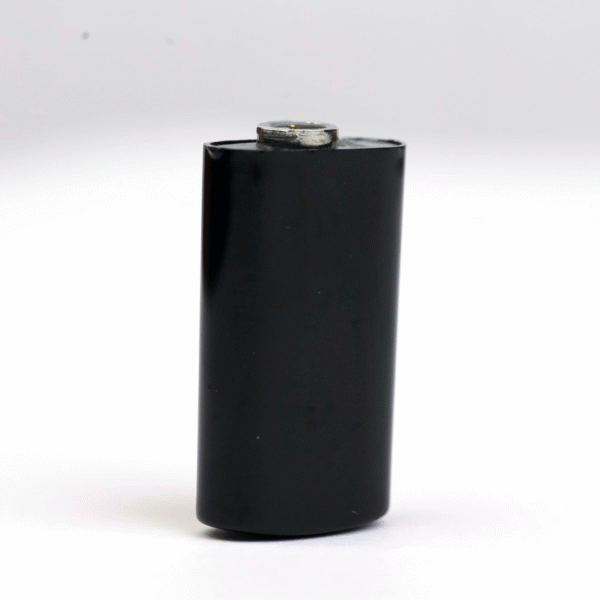


The Cochlear N8 Rechargeable Battery is a standard-size replacement battery module for the Cochlear Nucleus 8 (CP1110) sound processor. It clicks onto the base of your processor, comes in black and is listed under reference numbers P1757683 and Z544550. Use it as your everyday battery, or keep it charged in your bag as a backup for the day your main one runs flat.
The Nucleus 8 is a current processor, so buying this part is about never being left without sound. Users often say their rechargeable batteries fade sooner than they expected and that a second module is the easiest way to cover a full day. We dispatch worldwide within 24–48 hours and check a photo of your processor on WhatsApp before you pay.




Cochlear N8 Rechargeable Battery at a glance
| Fits | Cochlear Nucleus 8 (CP1110) sound processor |
|---|---|
| Size | Standard rechargeable battery module |
| Reference numbers | P1757683, Z544550 |
| Colour | Black |
| Price | $220 |
| Condition | New, third-party replacement part |
| Dispatch | 24–48 hours, tracked |
| Guarantee | 14 days on wrong or defective items |
The Cochlear N8 Rechargeable Battery is sold as a single module. We do not quote a number of hours per charge, because run time depends on your program, how much you stream and the age of the battery you compare it with. Any single figure would be a guess, and we would rather you plan with real experience from your own processor.
Will this Cochlear N8 Rechargeable Battery fit my processor?
| Processor | Fits this battery? | What to choose |
|---|---|---|
| Nucleus 8 (CP1110) | Yes | This battery |
| Nucleus 7 (CP1000) | Users report N8 and N7 battery modules swap between the two processors | Our dedicated Nucleus 7 standard battery, or ask us for a photo check |
| Nucleus 8 Nexa | Not confirmed | Send a photo before ordering |
| Nucleus 6 (CP910 / CP920) | No | The Nucleus 6 rechargeable battery |
| Nucleus 5 (CP810) | No | The Nucleus 5 rechargeable battery |
The model code is printed on the processor housing, on the box your processor came in and on your clinic paperwork. Nucleus 8 is CP1110 and Nucleus 7 is CP1000. If the code is worn or hard to read, a clear photo of the processor with the battery removed is usually enough for us to tell.
Batteries and coils follow different rules. Users report that battery modules swap between the N8 and the N7, but that N8 coils do not fit the N7. This page covers the battery only. If you are unsure, send us a photo on WhatsApp and we check the Cochlear N8 Rechargeable Battery against your processor before you pay.
Why Nucleus 8 users keep a spare battery
A rechargeable battery is the part of a sound processor that wears out first. It is also the part that leaves you in silence fastest when it fails, because there is no warning light that gives you an hour to find a charger. One spare module turns that moment into a ten-second swap.
- Long days. Streaming calls, music and TV all draw more power. A charged spare covers the evening.
- Travel. Flights, time zones and hotel sockets make overnight charging unreliable.
- School and work. A spare in a backpack or desk drawer means a child or adult never has to leave early.
- Waiting for a clinic. Users on hearing forums describe calling clinic after clinic and finding no spare on the shelf.
A second battery in the drawer costs less stress than running out on a busy day. Rechargeable cells wear with every cycle, so a spare bought now is also the one that keeps you hearing when the first one finally fades.
Signs your N8 battery needs replacing
- It does not hold a charge as long as it used to, and the drop is getting worse each month.
- The processor switches off with little or no warning, even though the battery showed charge in the morning.
- The charger light flashes instead of showing the steady colour that means a normal charge.
- The module feels loose, rattles or no longer clicks firmly into place.
- The housing has a crack, a swollen look or marks of corrosion on the contacts.
- Sound cuts in and out, and the problem stops when you swap to another battery.
The quickest test is a swap. If the fault follows the old battery onto a second module, the battery is the problem. If the fault stays with the processor, look at the coil cable or contact your clinic. An old Nucleus 8 battery that fails this test is ready to be replaced.
How to attach and charge the Cochlear N8 Rechargeable Battery
- Take the processor off your ear and switch it off, or let it power down when the battery is removed.
- Detach the old battery module the same way you always do, as shown in your Nucleus 8 user guide. Do not twist it at an angle or force it.
- Look at the contacts on the processor. Wipe away any dust or moisture with a soft, dry cloth.
- Line up the new module with the base of the processor and press until it clicks firmly into place.
- Before the first day of use, charge the Cochlear N8 Rechargeable Battery fully in your battery charger.
- Attach it, switch on and check the battery status on your processor or app.
Charge each new module fully before its first use, even if it arrives with some charge already. Starting from a full charge gives you an honest first day to judge it by.
Troubleshooting a Nucleus 8 battery
| What you see | Likely cause | What to do |
|---|---|---|
| Battery will not charge, or the charger light flashes | Dirty contacts or the module is not seated in the charger | Clean the contacts on the battery and charger with a dry cloth, then reseat. Users report this alone revived batteries they thought were dead. |
| Processor switches off suddenly | Battery is low or not fully clicked in | Reseat the battery, charge it fully and test again. Try a second module. |
| Battery runs down far faster than before | The cells have aged | Replace the battery and keep the old one only as a short emergency backup. |
| Module will not click into place | Wrong battery model, or dirt in the rail | Check the processor model, clean the rail and try again gently. |
| Sound cuts in and out when you turn your head | Usually the coil cable, not the battery | Swap batteries. If the cut-outs continue, check the coil and cable. |
| New battery does not seem to work | It needs a first full charge, or it is faulty | Charge fully. If it still fails, send us a short video. |
If the Cochlear N8 Rechargeable Battery arrives and none of these steps help, message us within 14 days with a short video and we sort it out.
How to make your Cochlear N8 Rechargeable Battery last longer
- Keep batteries away from heat: car dashboards, radiators, sunny windowsills and hot pockets.
- Keep the contacts clean and dry. Moisture and skin oils are the main cause of poor connection.
- Dry the processor overnight in a drying box such as our electric dryer.
- Do not leave a module fully empty in a drawer for weeks. Give stored spares a top-up charge now and then.
- Carry spares in a case, not loose with keys or coins that can scratch or short the contacts.
- When flying, keep batteries in your hand luggage.
With daily use, many people replace their rechargeable batteries roughly once a year. Rotating a second Cochlear N8 Rechargeable Battery with your current one spreads the wear across two modules.
Is a replacement battery safe for my Nucleus 8?
This is a third-party replacement battery, made to the same shape, contacts and specification as the module it replaces. It is not made by Cochlear, and we do not claim to be Cochlear or an authorised dealer. We sell compatible spare parts and say so clearly.
Users often ask whether a battery from another maker can harm the processor. Every Cochlear N8 Rechargeable Battery is checked before dispatch to make sure it seats, charges and powers a processor normally. If yours does not seat, does not charge or behaves oddly, stop using it and tell us. We replace it or refund you, and we cover the return shipping.
Standard, Compact and Power Extend: which size is this?
Nucleus 8 battery modules are sold in more than one size. Standard is the everyday size. Compact is smaller and lighter, and generally gives less time per charge. Power Extend is a larger module for people who want the longest day on a single charge.
The Cochlear N8 Rechargeable Battery on this page is the Standard size, in black. If you are used to a Compact module, expect this one to sit a little longer on the processor. If you are not sure which size you have now, send a photo of your old battery next to a coin and we tell you.
Shipping, payment and returns for the Cochlear N8 Rechargeable Battery
Every Cochlear N8 Rechargeable Battery order is packed and dispatched within 24–48 hours with tracking. Delivery usually takes 12–22 business days worldwide, and duties are handled for you on most routes, so there is nothing extra to pay at the door. Shipping is free on orders over $250, which is easy to reach if you add a spare cable or charger.
Payment runs through a secure payment gateway with all major cards. If we send the wrong item, or the part arrives defective or damaged, message us within 14 days with a short video. We replace it or refund you, and we cover the return shipping. Change-of-mind returns are not accepted on hygiene-sensitive hearing parts. Full details are in our return policy.
Other Nucleus 8 parts you may need
Keep your Nucleus 8 working with these matching spares:
- Cochlear Nucleus 7 standard rechargeable battery – users report N7 battery modules also fit the N8; photo check first
- Cochlear Nucleus 7 charger – Y charger or USB charger; ask us to confirm it suits your N8 modules
- Electric dryer for cochlear implant processors – overnight drying to protect contacts and batteries
Cochlear N8 Rechargeable Battery FAQ
Does this battery also fit the Nucleus 7?
Users report that battery modules swap between the Nucleus 8 and Nucleus 7. Send us a photo and we confirm before you pay, or choose our dedicated Nucleus 7 standard battery.
Which charger does it use?
Charge the Cochlear N8 Rechargeable Battery in the battery charger that came with your Nucleus 8. Users report the Nucleus 7 Y charger and USB charger also take N8 modules, but ask us first if that is your plan.
Is this the Standard or Compact size?
This listing is the Standard size in black. We do not currently list a Compact or Power Extend version.
How many hours does one charge last?
It depends on your program, streaming and settings, so we do not publish a figure. Charge it fully and judge it on a normal day.
Do I need my audiologist to change the battery?
No. A battery module is a direct swap and needs no programming. You attach it the same way as your current one.
Will it work on a Nucleus 8 Nexa?
We have not confirmed the Cochlear N8 Rechargeable Battery on the Nexa version. Send a photo of your processor and we check before you order.
Why does the listing show two reference numbers?
P1757683 and Z544550 both appear so you can match the number printed on your old battery or paperwork. If yours shows a different number, send us a photo.
What if the battery arrives faulty?
Message us within 14 days with a short video. We replace it or refund you and cover the return shipping.
Can I keep a spare charged for months?
Yes, but give a stored Cochlear N8 Rechargeable Battery a top-up charge every few weeks rather than leaving it empty.
Questions about your Nucleus 8? Message us on WhatsApp (+1 520 473 4179) with a photo of your processor and we confirm the right part before you pay.




Reviews
There are no reviews yet.