






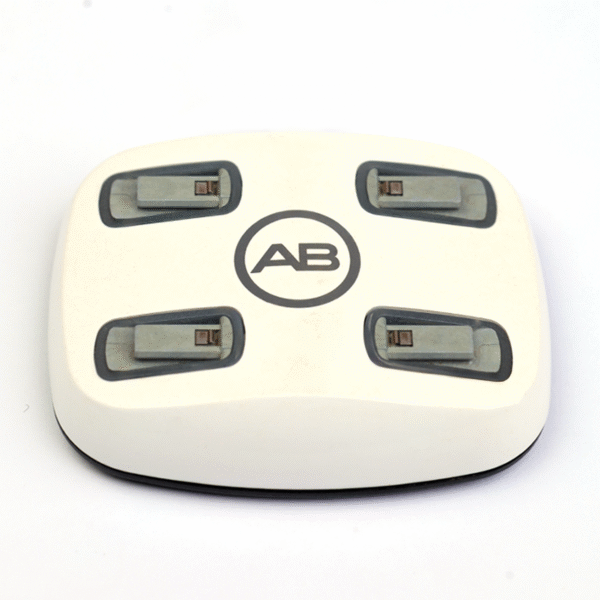


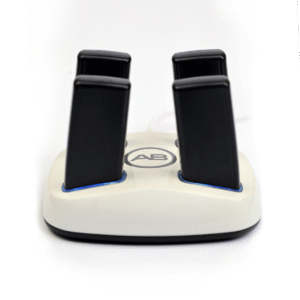


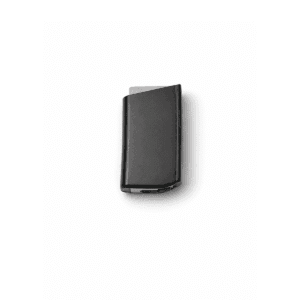
The AB Q90 Charger is a replacement PowerCel charger for the Advanced Bionics Naída CI Q90, the newest processor in the Naída CI Q range. It follows the CI-5605 charger and CI-5615 power supply specification and recharges the PowerCel batteries your Q90 runs on, ready for a full day of listening.
The Naída CI Q90 is a cochlear implant sound processor, so please do not confuse it with the Phonak Naída hearing aid; their batteries and chargers are not interchangeable. Q90 wearers tend to use their processor hard, with long days, phone calls and streaming, and that puts steady demand on the charger. This AB Q90 Charger gives you a dependable replacement or a second unit to keep at work or in your travel bag.




AB Q90 Charger at a glance
| Processor | Advanced Bionics Naída CI Q90 |
|---|---|
| Charges | Naída CI Q PowerCel rechargeable batteries |
| Part numbers | CI-5605 charger, CI-5615 power supply |
| Product type | Third-party replacement, compatible with the Naída CI Q range |
| Colour | See product photo |
| Price now | $239 (regular price $455) |
| Dispatch | 24–48 hours |
| If something is wrong | We replace or refund defective or wrong items |
The AB Q90 Charger has one job: refill your PowerCel batteries safely overnight. It does not store programs or connect to your implant, so your Q90 settings stay exactly as your audiologist set them.
Will this AB Q90 Charger fit my processor?
| Processor and battery | Charges in this unit? | Related product |
|---|---|---|
| Naída CI Q90 + PowerCel 230 | Yes | Q90 PowerCel 230 battery |
| Naída CI Q90 + PowerCel 110 Mini | Yes | Q90 PowerCel 110 Mini |
| Naída CI Q90 Bluetooth battery | Ask us first | Q90 Bluetooth battery (170) |
| Naída CI Q70 | Yes, same charger | Naida CI Q70 charger |
| Naída CI Q30 | Yes, same charger | Naida CI Q30 charger |
| Naída CI M90 (Marvel) | No | Uses its own battery charger |
| Advanced Bionics Harmony | No | Auria PowerCel charger only |
| Phonak Naída hearing aid | No | Hearing aid, not a CI processor |
The Q90 and the older Q70 look almost identical, so check the model printed on the processor casing or your clinic records rather than relying on appearance. If you use the Q90 Bluetooth battery, message us on WhatsApp before ordering and we will confirm how it charges with your setup.
Why Q90 users keep a spare AB Q90 Charger
The Naída CI Q90 is the most advanced of the Q processors, and many people rely on it for work, study and family life. A charger is the one accessory that, if it fails, takes every battery out of action at once, so a spare matters more each year.
Repairs can be costly. One Q90 user on a hearing forum reported paying the equivalent of $1,100 for an off-warranty service. Compared with that, a second AB Q90 Charger is a small price for peace of mind.
- Keep one charger at home and one at the office.
- Pack the spare when you travel, so a forgotten charger never cuts a trip short.
- If a charger fails, your batteries keep running while you sort out a replacement.
Families with more than one implant user often find a second charger especially useful. A child and a parent who both wear Naída CI Q processors can share one unit at home and keep another in the car or at school. Because the Q30, Q70 and Q90 share the same charger part number, one spare covers everyone in the household.
Signs your Q90 charger or battery needs attention
Q90 users on hearing forums describe battery life as disappointing on some days and report batteries developing cracks in the casing over time. Some of those problems are the battery; some are the charger. Watch for:
- Batteries that do not hold a charge through your usual day, even when newly charged.
- A cracked or swollen battery casing. Stop using that battery immediately.
- A charger light that flashes or never reaches a full-charge state.
- A charger that only works with the lead held at an angle.
- Sound that cuts in and out as the battery runs low, which can be mistaken for a cable fault.
- A charger that stopped working with no visible damage.
Before you replace anything, try the simplest checks first. Clean the battery contacts, try a different wall socket, and charge two different batteries overnight. Note which battery runs out first the next day. These three steps usually tell you whether you need a new battery, a new Naida CI Q90 charger, or neither.
Never ignore heat. A battery or charger that becomes hot rather than slightly warm should be unplugged and set aside until it is replaced.
How to charge your Q90 with the AB Q90 Charger
- Connect the CI-5615 power supply to the charger and plug it into a wall socket.
- Switch off your Q90 and slide the PowerCel off the processor.
- Check the battery casing for cracks before charging. Never charge a damaged battery.
- Wipe the battery contacts with a dry cloth.
- Place the battery in a charging position until it sits flush.
- Leave it until the indicator shows a full charge; overnight is ideal.
- Reattach the battery to your Q90 and switch on.
On days with heavy phone use or streaming, keep a second charged battery with you. Swapping takes seconds and saves you from running out at the worst moment.
AB Q90 Charger troubleshooting table
| Symptom | Most likely cause | Next step |
|---|---|---|
| Battery charges but lasts much less than usual | Battery aging, or charger not completing the charge | Test a new battery; if it lasts normally, replace the old one. |
| Battery casing cracked | Physical wear or a drop | Retire the battery; do not charge it again. |
| Charger light never shows full charge | Dirty contacts or a failing charger | Clean contacts and retry; replace the charger if unchanged. |
| Sound drops in and out late in the day | Low battery or worn headpiece cable | Swap in a fresh battery; if dropouts continue, check the cable. |
| Charger dead after a power cut | Surge damage | Try another socket; replace if it will not power up. |
| Charger warm but battery stays flat | Battery has failed | Replace the PowerCel. |
If sound cuts out when you turn your head and the battery is fresh, look at your Q90 UHP headpiece cable rather than the charger.
Keep a note of when you bought each battery and charger. When something goes wrong, knowing the age of each part makes it much easier to decide what to replace first, and it helps us confirm the right part if you ask us for advice.
How to make your AB Q90 Charger last longer
- Give the charger its own spot, away from water and heat sources.
- Keep the charging positions free of dust and lint.
- Let batteries cool for a few minutes after a long day before charging.
- Do not leave the charger in a hot car or on a sunny windowsill.
- Plug and unplug by the plug body, never by the cable.
- Use a plug adapter abroad, never a voltage converter.
Most PowerCel batteries show their age after about a year of daily use. The charger usually outlasts several sets of batteries if it is looked after.
If you live somewhere humid, store the charger in a room with steady air rather than a bathroom or basement, and dry your processor and batteries before charging. A cochlear implant dryer used overnight takes care of the moisture that slowly dulls charging contacts.
Is a replacement AB Q90 Charger safe for my processor?
Yes, when it matches the correct specification. This is a third-party compatible charger that follows the CI-5605 charger and CI-5615 power supply part numbers. It only charges the PowerCel battery; it has no electrical connection to your implant or to the Q90 processor while you wear it.
We check every charger before dispatch. If yours arrives defective or turns out to be the wrong part, we replace it or refund you. We are an independent supplier, not Advanced Bionics.
How long should a charge last on a Q90?
Wearing time depends on the battery size, your implant, your program and how much you stream. As one example, a Q90 user on a hearing forum reported around 8 hours per charge from a PowerCel 230. Your result may be longer or shorter.
The PowerCel 110 Mini is lighter but gives less time per charge, so many Q90 users carry one as a backup rather than as their main battery. If a battery that used to last your whole day now runs out by mid-afternoon, it is usually the battery aging, not the AB Q90 Charger.
Features that keep the processor working harder, such as wireless streaming and long phone calls, use more power, so your heaviest days will drain a battery faster than quiet days at home. Planning for that with a charged spare is easier than rationing your listening.
If you are unsure whether your wearing time is normal for your setup, your audiologist can check your program, and we can help you choose a battery size that suits the way you use your Naida CI Q90 charger and batteries.
Shipping, payment and returns for the AB Q90 Charger
Every AB Q90 Charger order is packed and dispatched within 24–48 hours with tracking. Delivery usually takes 12–22 business days worldwide, and duties are handled for you on most routes, so there is nothing extra to pay at the door. Shipping is free on orders over $250, which is easy to reach if you add a spare cable or charger.
Payment runs through a secure payment gateway with all major cards. If we send the wrong item, or the part arrives defective or damaged, message us within 14 days with a short video. We replace it or refund you, and we cover the return shipping. Change-of-mind returns are not accepted on hygiene-sensitive hearing parts. Full details are in our return policy.
Other Naida CI Q90 parts you may need
Keep your Naida CI Q90 working with these matching spares:
- Naida CI Q90 PowerCel 230 battery – Full-size rechargeable battery.
- Naida CI Q90 PowerCel 110 Mini – Lightweight backup battery.
- Naida CI Q90 Bluetooth battery – Bluetooth battery for the Q90.
- Naida CI Q90 UHP headpiece cable – For dropouts and frayed cables.
- Naida CI Q90 T-Mic 2 – Ear-canal microphone.
- Naida CI Q90 ear hook – Small or standard.
AB Q90 Charger FAQ
Is the AB Q90 Charger the same as the Q70 charger?
Yes. The Q30, Q70 and Q90 all use the CI-5605 charger.
My Q90 battery only lasts a few hours. Do I need a new charger?
Test with a new battery first. If the new one lasts well, the old battery is worn and the charger is fine.
Can I charge a cracked battery?
No. Stop using any battery with a cracked or swollen casing.
Does it charge the PowerCel 110 Mini?
Yes. Both the PowerCel 230 and 110 Mini charge in it.
What about the Q90 Bluetooth battery?
Message us on WhatsApp before ordering and we will confirm charging for your battery.
Can I charge my Marvel M90 batteries in it?
No. The Naída CI M90 uses a different charger.
Is the charger safe to leave on overnight?
Yes, overnight charging is the normal routine. Keep it on a hard, dry surface.
Do you ship worldwide?
Yes. Shipping details are below.
Will replacing the charger affect my Q90 program?
No. The charger has no connection to your hearing program.
Questions about your Naida CI Q90? Message us on WhatsApp (+1 520 473 4179) with a photo of your processor and we confirm the right part before you pay.







lubomiryuriev –
Totally recommend