






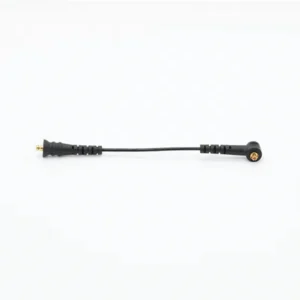


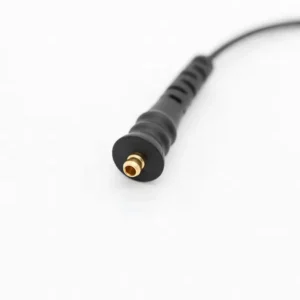


The Naida CI Q90 Cable is a replacement UHP headpiece cable for the Advanced Bionics Naída CI Q90, the top model of the Naída CI Q family. It carries sound data and power from the processor on your ear to the Universal Headpiece over your implant. You can choose 9 cm, 11 cm or 26 cm, all from the CI-5415 cable series.
Q90 wearers often use their processor from first thing in the morning until late at night, and the cable takes the strain. One Q90 user described replacing the headpiece connecting cable twice in about three years. That is normal wear, not bad luck, and it is the reason a spare cable belongs in every Q90 kit.
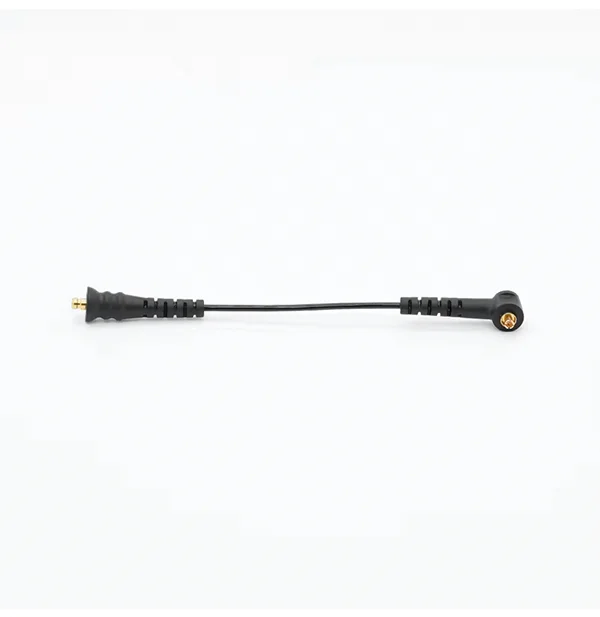



Naida CI Q90 Cable at a glance
| Made for | Advanced Bionics Naída CI Q90 with the Universal Headpiece (UHP) |
|---|---|
| Cable series | CI-5415 (CI-5415-201 is 9 cm, CI-5415-202 is 11 cm) |
| Lengths | 9 cm, 11 cm, 26 cm |
| Color | Black |
| Price | $89.99, any length (regular price $150) |
| Dispatch | 24–48 hours with tracking |
| Our promise | Wrong or defective item replaced or refunded within 14 days |
You may also see this part called a UHP cable or a Naida Q90 cable. Choose the same length as the Naida CI Q90 Cable you wear now; the price does not change between lengths. If your old cable is too worn to measure, send us a photo of it next to a ruler and we will confirm the size before you pay.
Will this Naida CI Q90 Cable fit my processor?
Check two things: the processor model and the headpiece. If both match the first row, this is your cable.
| Your setup | Fits? | Where to order |
|---|---|---|
| Naída CI Q90 + Universal Headpiece | Yes | Order here |
| Naída CI Q70 + Universal Headpiece | Yes, same CI-5415 cable | See the Q70 headpiece cable |
| Naída CI Q30 + Universal Headpiece | Yes, same CI-5415 cable | See the Q30 headpiece cable |
| Naída CI M90, M30 or Sky CI M90 (Marvel) | No | Marvel uses the Slim HP headpiece and a different cable |
| Advanced Bionics Harmony | Ask first | Send us a photo on WhatsApp |
| Cochlear or MED-EL processors | No | Different system |
The model is printed on the processor body. Q90 is the Q-series model; anything starting with M belongs to the newer Marvel platform. If you received a Marvel upgrade but still keep your Q90 as a backup, this cable is for the Q90.
How often does a Q90 headpiece cable need replacing?
There is no fixed schedule. A cable lasts as long as its wires and plugs stay intact, and that depends on how you wear it, how much you sweat and how often you take the processor on and off.
User reports give a realistic picture. A Q90 wearer on a hearing forum said their headpiece connecting cable was replaced twice and the T-Mic once over roughly three years. Other cable users describe insulation that splits, or a cable that simply stops with no visible damage.
For that reason, we suggest treating the Naida CI Q90 Cable like a pair of glasses: keep a second one where you can reach it. If the cable in use fails at work, at school or on a trip, you swap it in two minutes and carry on.
Signs it is time for a new Naida CI Q90 Cable
- The sound comes on and off, and it gets worse when you turn your head or chew
- You hear sound only when the cable sits in one position
- Visible fraying, a kink or a flattened spot in the wire
- Discolored or bent pins on either plug
- Your Q90 signals a headpiece problem while the headpiece is in place
- A spare cable fixes a fault that the old cable keeps causing
If you have no spare to test with, look closely at both plugs and the first few centimeters of wire next to them. That is where most cables break, because it is where they bend most.
Cable, battery or headpiece? Finding the fault
Intermittent sound on a Q90 can come from several parts. Change one thing at a time so you know which one fixed it.
| What you notice | Most likely part | First test |
|---|---|---|
| Dropouts when you move your head | Cable | Swap in a spare cable |
| Processor turns off without warning | Battery | Fit a charged spare battery |
| Battery will not charge fully | Battery or charger | Try another battery in the same charger |
| Headpiece keeps slipping off | Cable length or magnet | Check the length first; your clinic sets the magnet |
| Sound is weak or muffled but steady | Microphone or T-Mic | Check the microphone cover or T-Mic |
| Nothing works with new parts | Processor or headpiece | Contact your clinic |
A Naida CI Q90 rechargeable battery and a cable are the two spares that solve most everyday faults. Having both lets you test quickly at home.
How to change the Naida CI Q90 Cable
- Switch off the Q90 and slide off the battery.
- Grip the plug at the processor end and pull it straight out. Repeat at the headpiece.
- Check both sockets for lint, dust or moisture and clean with a dry, soft cloth.
- Take the new cable and match each plug to the socket it came from.
- Push each plug straight in until it sits fully.
- Refit the battery, switch on, and place the headpiece.
- Walk around and turn your head a few times to confirm the sound is steady.
Do not use force, pliers or tape. A plug that will not seat is almost always at an angle or in the wrong socket.
Q90, Q70 and Q30: one cable, three processors
The three Naída CI Q processors differ in features, but they share the Universal Headpiece and the CI-5415 headpiece cable. That has two practical benefits for Q90 owners.
- If your family has more than one Q-series processor, the same spare cable can serve all of them.
- If you keep an older Q70 or Q30 as a backup, one length of cable may cover both processors.
What the three do not share is a Marvel connection. The Naída CI M90, M30 and Sky CI M90 use the Slim HP headpiece and need their own cable, so a Q-series cable will not help once you move to Marvel.
Building a spare kit for your Q90
A small kit lets you fix most everyday faults on the spot, without waiting for an appointment or a delivery. It fits in a pencil case or the pocket of a bag.
- A spare Naida CI Q90 Cable in the length you wear every day
- A charged spare PowerCel battery
- A dry, soft cloth for wiping plugs and contacts
- A small hard case to protect the processor when it is off your ear
- Your clinic phone number and your processor serial number, written on a card
When you travel, keep the kit in your carry-on bag rather than checked luggage, so it stays with you if a suitcase goes missing. Pack the charger and a plug adapter for the country you are visiting, and dry the processor each night, because hotel rooms and beach days can both be humid.
If a child wears a Q90, consider a second spare kit for school. A teacher or school nurse with a spare Naida CI Q90 Cable and a charged battery can get a child hearing again in a few minutes instead of sending them home.
Check the kit every few months. Charge the spare battery, look over the spare cable, and replace anything you have used. A kit that is out of date does not help on the day you need it.
Caring for your Naida CI Q90 Cable
- Pull on the plug, never on the wire.
- Dry the processor and cable overnight in an electric processor dryer, especially after hot days or exercise.
- Remove the processor before showers, swimming and hair products.
- Store it in a case without winding the cable tightly.
- Keep the spare in a clean bag, away from coins and keys.
- Look at the plugs every week or two for color changes.
No cable lasts forever. Bending and moisture wear it down slowly, so plan on replacing it from time to time even with careful use.
Is a third-party cable safe on a Naída CI Q90?
Yes. This is a compatible replacement, not a part made by Advanced Bionics. It uses the same CI-5415 connector, length and specification as the cable it replaces, and every cable is checked before it leaves us.
The Naida CI Q90 Cable only carries the signal and power. Your program stays in the processor, so your settings do not change. If the cable arrives defective, or you received the wrong length, we replace it or refund you.
If a new cable does not bring the sound back, please speak to your clinic. That usually means the fault is in the headpiece, battery or processor.
Shipping, payment and returns for the Naida CI Q90 Cable
Every Naida CI Q90 Cable order is packed and dispatched within 24–48 hours with tracking. Delivery usually takes 12–22 business days worldwide, and duties are handled for you on most routes, so there is nothing extra to pay at the door. Shipping is free on orders over $250, which is easy to reach if you add a spare cable or charger.
Payment runs through a secure payment gateway with all major cards. If we send the wrong item, or the part arrives defective or damaged, message us within 14 days with a short video. We replace it or refund you, and we cover the return shipping. Change-of-mind returns are not accepted on hygiene-sensitive hearing parts. Full details are in our return policy.
Other Naida CI Q90 parts you may need
Keep your Naida CI Q90 working with these matching spares:
- Naida CI Q90 rechargeable battery (PowerCel 230) – a charged spare for long days
- Naida CI Q90 PowerCel battery charger – overnight charging for your batteries
- Naida CI Q90 T-Mic 2 – replacement ear canal microphone
- Electric dryer for processors – dries your Q90 and cable every night
Naida CI Q90 Cable FAQ
Does this cable fit both the Q90 and my old Q70?
Yes. Both use the Universal Headpiece and the CI-5415 cable, so one cable works on either processor.
I have a Naída CI M90 now. Will this cable fit?
No. The M90 is a Marvel processor with the Slim HP headpiece, which uses a different cable.
How long should a Q90 cable last?
It depends on use and moisture. One user reported two cable replacements in about three years. Keep a spare so a failure never leaves you without sound.
Which length suits me?
Order the length you wear now. The 9 cm and 11 cm cables are for wearing the processor behind the ear, and the 26 cm cable is for wearing it off the ear, for example clipped to clothing. A cable that pulls on the headpiece is too short; one that loops and catches is too long.
Can I tell if a cable is bad without a spare?
Look for fraying, kinks or discolored pins near the plugs. A cable can still fail inside with no outward sign, which is why a spare is the best test.
Will I need to be reprogrammed after changing the cable?
No. The cable does not store any settings.
Is it the same price for all lengths?
Yes. Each length of the Naida CI Q90 Cable is $89.99.
Does the cable work with the T-Mic 2?
Yes. The T-Mic 2 attaches to the processor, and the cable connects the processor to the headpiece. They do not affect each other.
What if the new cable does not work?
Message us with a short video within 14 days. If it is defective or the wrong item, we replace it or refund you.
Questions about your Naida CI Q90? Message us on WhatsApp (+1 520 473 4179) with a photo of your processor and we confirm the right part before you pay.






lubomiryuriev –
Charger and cable work perfectly Fast shipping to Spain and free delivery over $250
frederickgsmithers –
very good and Highly recommend
ezz (store manager) –
good