






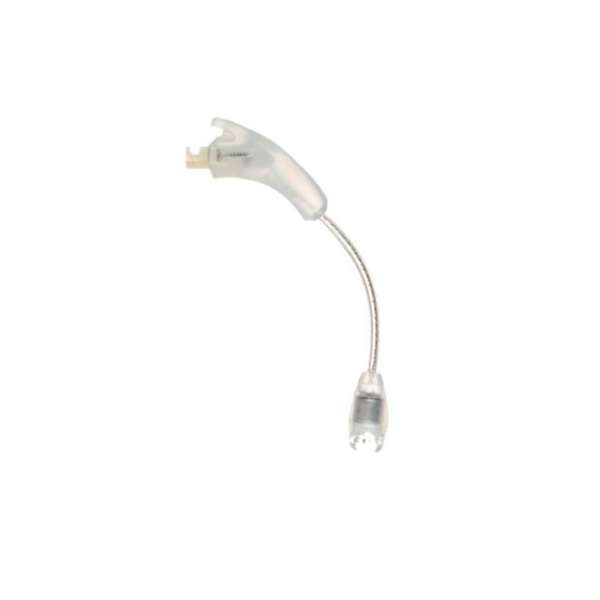

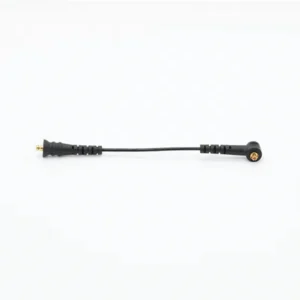
The Naida CI Q90 T-Mic is a replacement T-Mic 2 microphone for the Advanced Bionics Naída CI Q90, the newest model in the Naída CI Q range. It fits in place of the ear hook and positions a small microphone right at the entrance to your ear canal, so your outer ear helps gather and shape sound as nature intended. It matches part number CI-5835 in S, M and L arm lengths.
This is for the Naída CI Q90 cochlear implant processor, not the Phonak Naída hearing aid. Q90 wearers often rely on the T-Mic for phone calls and busy conversations, and it is a part that wears out over time. One Q90 user on a hearing forum reported replacing their T-Mic once in about three years. When yours fades or breaks, this Naida CI Q90 T-Mic gets you back to natural listening quickly.
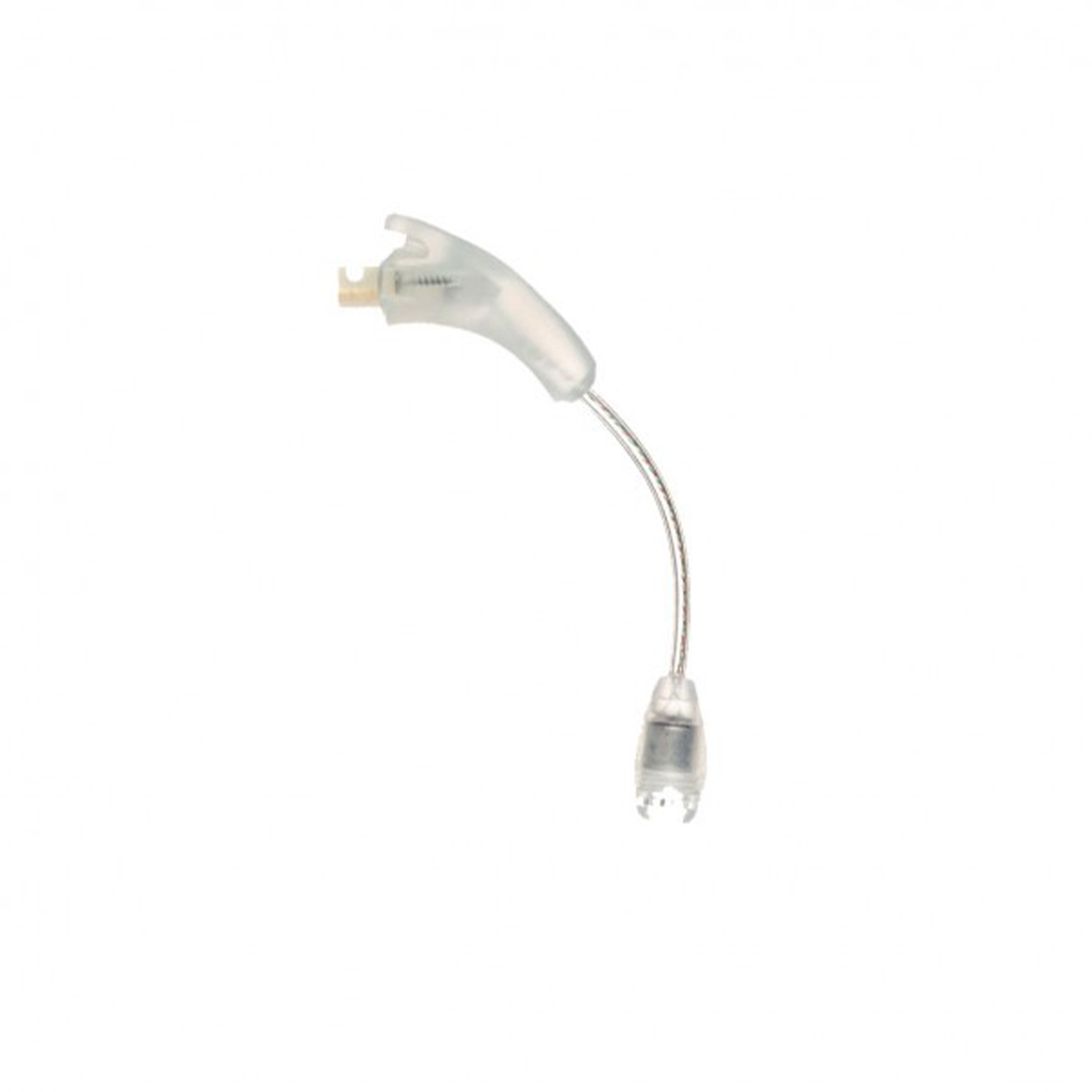



Naida CI Q90 T-Mic at a glance
| For | Advanced Bionics Naída CI Q90 |
|---|---|
| Part number | CI-5835 (T-Mic 2) |
| Arm sizes | S (-100), M (-200), L (-300) |
| Selecting your size | Note it in your order or message us on WhatsApp |
| What it is | Third-party replacement, compatible with the Q90 |
| Colour | As in the photo |
| Price | $120 (regular price $197) |
| Dispatch | 24–48 hours |
| If anything is wrong | Replacement or refund for defective or wrong items |
The Naida CI Q90 T-Mic is an active microphone with wiring through its arm. It plugs into the same connector as a plain ear hook and feeds sound to the processor from a more natural position.
Will this Naida CI Q90 T-Mic fit my processor?
| Processor | Compatible? | Product |
|---|---|---|
| Naída CI Q90 | Yes | This product |
| Naída CI Q70 | Yes, same part | Naida CI Q70 T-Mic |
| Naída CI Q30 | Yes, same part | Naida CI Q30 T-Mic |
| Naída CI M90 (Marvel) | No | Different design |
| Advanced Bionics Harmony | No | Uses the Auria T-Mic |
| Phonak Naída hearing aid | No | Hearing aid, not an implant processor |
Find the model printed on your processor casing; the Q90 and Q70 share almost the same body, so check the print. To choose the size, compare with your old T-Mic or check your clinic notes. Send us a photo on WhatsApp if you would like us to confirm.
Because the whole Q range shares one T-Mic part, a household with a Q90 and an older Q70 or Q30 can keep a single spare that works for everyone. That is especially useful for families where both a parent and a child wear Naída CI Q processors.
Why Q90 users keep a spare Naida CI Q90 T-Mic
The Q90 is the most capable processor in the Q range, and many people depend on it for work and family life. As newer processors take over, it makes sense to protect the one you have with a few key spares.
The T-Mic is the part most exposed to everyday knocks. It is caught by glasses, scarves and helmets, and its thin arm can kink. Users also report that repairs are expensive: one Q90 user mentioned paying the equivalent of $1,100 for an off-warranty service. A spare microphone is a small cost by comparison.
- Swap in seconds when the old one fails.
- Travel without worrying about finding parts abroad.
- Keep phone calls natural while you sort out anything else.
Keep the spare where you will actually find it in a hurry: in the processor case, your travel bag, or a drawer next to the charger. Store it in a small dry box with its arm lying in its natural curve, so it is ready to fit the moment you need it.
Signs your Q90 T-Mic needs replacing
- Speech sounds dull or distant, as if through a wall.
- Phone calls are harder than they used to be with the phone held to your ear.
- Crackling or scratching sounds when you move.
- Sound cuts in and out with head movement.
- The arm no longer keeps its shape, or the microphone keeps slipping away from the ear canal.
- No visible damage, but it stopped working.
Remember that the headpiece cable can cause similar dropouts. The same Q90 user who replaced a T-Mic also replaced their headpiece cable twice in that period, so check both before buying.
Changes in the microphone are often gradual, so they are easy to miss. If you find yourself turning up the volume more often, asking people to repeat themselves, or switching off the phone for text messages instead, it is worth checking the T-Mic before assuming your hearing or your program has changed.
Run the simple checks first: a freshly charged battery, a clean microphone opening, and a look at the arm under good light.
How to fit the Naida CI Q90 T-Mic
- Turn the Q90 off and remove it from your ear.
- Holding the processor body firmly, pull the old T-Mic or hook straight off the connector.
- Wipe the connector with a clean, dry cloth.
- Press the new Naida CI Q90 T-Mic straight onto the connector until it is firm.
- Place the processor behind your ear and run the arm down the front of your ear.
- Position the microphone at the ear canal opening, resting lightly without going inside.
- Switch on and test in a quiet room, then make a short phone call holding the phone to your ear.
If the T-Mic is new to you, ask your audiologist to check your program uses the T-Mic microphone.
A new microphone often sounds brighter than the one it replaces, particularly if the old one had been fading for months. Give it a day before judging the result. If the arm sits awkwardly, adjust how it rests along the front of your ear before deciding you need another size.
Naida CI Q90 T-Mic troubleshooting
| Symptom | Likely cause | What to do |
|---|---|---|
| Weak or muffled sound | Wax or dust in the microphone opening | Brush gently with a soft, dry brush. |
| Crackle or static | Damaged wire inside the arm | Replace the T-Mic. |
| Microphone drifts out of position | Arm too short or bent | Choose a longer size or replace the arm. |
| Discomfort in the ear canal | Arm too long | Choose a shorter size. |
| Dropouts with head movement | T-Mic wire or headpiece cable | Try a plain hook; if dropouts continue, replace the Q90 UHP headpiece cable. |
| No improvement with new T-Mic | Program set to processor microphones | Ask your audiologist to check the microphone setting. |
Make a short note of what you tried and what changed. If you message us, that record helps us work out whether you need the microphone, the cable or simply a size swap, so you only buy what you need.
How to make your Naida CI Q90 T-Mic last longer
- Take the processor off by lifting the body, not pulling on the microphone arm.
- Brush the microphone opening every few days with a dry brush.
- Dry the processor overnight in a cochlear implant dryer, particularly after exercise or in humid weather.
- Use a hard case for storage and travel; avoid pockets.
- Keep hair products and sunscreen away from the microphone.
- Remove the processor before putting on helmets or pulling clothes over your head.
Even with good care, the T-Mic is a wear part. Plan to replace it from time to time over the life of your Q90.
Glasses wearers can protect the arm by putting the processor on first and then sliding the glasses arm in front of it. Face mask loops are another common cause of snags; masks that tie behind the head are kinder to the T-Mic.
Is a replacement Naida CI Q90 T-Mic safe for my processor?
It is a third-party, compatible T-Mic 2 made to the CI-5835 part specification for the Naída CI Q range. It provides a microphone input and does not change your implant or your program in any way.
We test each microphone before dispatch. If yours arrives faulty, or is the wrong part or size, we replace it or refund you. We are an independent supplier, not Advanced Bionics.
Phone calls and everyday listening with a Q90 T-Mic
The main reason people choose a T-Mic over a plain ear hook is the phone. With the microphone at the ear canal, you hold the phone to your ear like anyone else, rather than angling it towards the top of the processor. Many users also find conversation in a busy room feels more natural, because the outer ear adds directional cues.
| T-Mic | Plain ear hook | |
|---|---|---|
| Phone held to ear | Natural position | Hold near the top of the processor |
| Wind | Sheltered in the ear | More exposed |
| Sport and helmets | Can snag | Very robust |
| Replacement cost | $120 | $20 |
Many Q90 users wear the T-Mic every day and keep a Naida CI Q90 ear hook in their case as a backup.
If you use the Q90 Bluetooth battery or other accessories for streaming, those work alongside the microphone you wear. Your audiologist can tell you how your program mixes streamed sound with sound from the Naida CI Q90 T-Mic, and whether a different setting would suit calls or noisy places better.
Shipping, payment and returns for the Naida CI Q90 T-Mic
Every Naida CI Q90 T-Mic order is packed and dispatched within 24–48 hours with tracking. Delivery usually takes 12–22 business days worldwide, and duties are handled for you on most routes, so there is nothing extra to pay at the door. Shipping is free on orders over $250, which is easy to reach if you add a spare cable or charger.
Payment runs through a secure payment gateway with all major cards. If we send the wrong item, or the part arrives defective or damaged, message us within 14 days with a short video. We replace it or refund you, and we cover the return shipping. Change-of-mind returns are not accepted on hygiene-sensitive hearing parts. Full details are in our return policy.
Other Naida CI Q90 parts you may need
Keep your Naida CI Q90 working with these matching spares:
- Naida CI Q90 ear hook – Plain hook backup.
- Naida CI Q90 UHP headpiece cable – Fixes cable-related dropouts.
- Naida CI Q90 PowerCel 230 battery – Full-size rechargeable.
- Naida CI Q90 PowerCel 110 Mini – Lighter rechargeable.
- Naida CI Q90 Bluetooth battery – Bluetooth battery option.
- AB Q90 charger – PowerCel charger CI-5605.
Naida CI Q90 T-Mic FAQ
Why choose a T-Mic over a plain ear hook on a Q90?
It places the microphone at the ear canal, so phone calls and conversation feel more natural.
Does the Naida CI Q90 T-Mic fit the Q70 and Q30?
Yes. The T-Mic 2 part is shared across the Naída CI Q range.
Which arm length should I order?
Match your current size. Go longer if the microphone drifts out, shorter if it presses into the ear.
How do I tell you my size?
Write S, M or L in your order notes, or message us on WhatsApp.
My calls are hard even with the new T-Mic. What now?
Ask your audiologist to check your program uses the T-Mic microphone.
Is my T-Mic or cable causing dropouts?
Swap in a plain ear hook. If dropouts continue, the cable is the likely cause.
Will it fit the Marvel M90?
No. Marvel processors use a different design.
How long does a T-Mic last?
It varies with care and use. One Q90 user reported replacing theirs once in about three years.
What if it arrives faulty?
We replace it or refund you. Contact us with your order number.
Questions about your Naida CI Q90? Message us on WhatsApp (+1 520 473 4179) with a photo of your processor and we confirm the right part before you pay.







julia0193 –
Calidad increíble a un precio inmejorable. El T-Mic es 10/10 y el envío fue súper veloz
coletteboutot –
T-Mic super, prix sympa et livraison express